Client tokens are dedicated tokens for posting traces from frontends such as browsers and mobile applications.
- What are client tokens?
- Differences from API keys
- Creating client tokens
- Deleting client tokens
- Rate limits
- Sampling recommendations
- Usage
What are client tokens?
Mackerel normally uses API keys to post traces, but embedding API keys in frontend or mobile applications risks exposing them to end users. Since API keys can perform many operations beyond posting traces, the impact of exposure is significant.
Client tokens are provided to mitigate the security risks of posting traces from frontend and mobile applications. Since client tokens are scoped to trace posting only, they can be safely embedded in the code of end-user-facing applications.
Differences from API keys
| Client Token | API Key | |
|---|---|---|
| Scope | Trace posting only | All API operations (depending on Read/Write permissions) |
| Authentication header | X-Mackerel-Client-Token |
Mackerel-Api-Key |
| Use case | Frontend (browser, mobile) | Server-side |
| Per-token rate limit | Configurable (per token) | Not available |
Creating client tokens
Client tokens can be created from the API Keys tab in the dashboard. Owner or Manager permissions are required to create them.
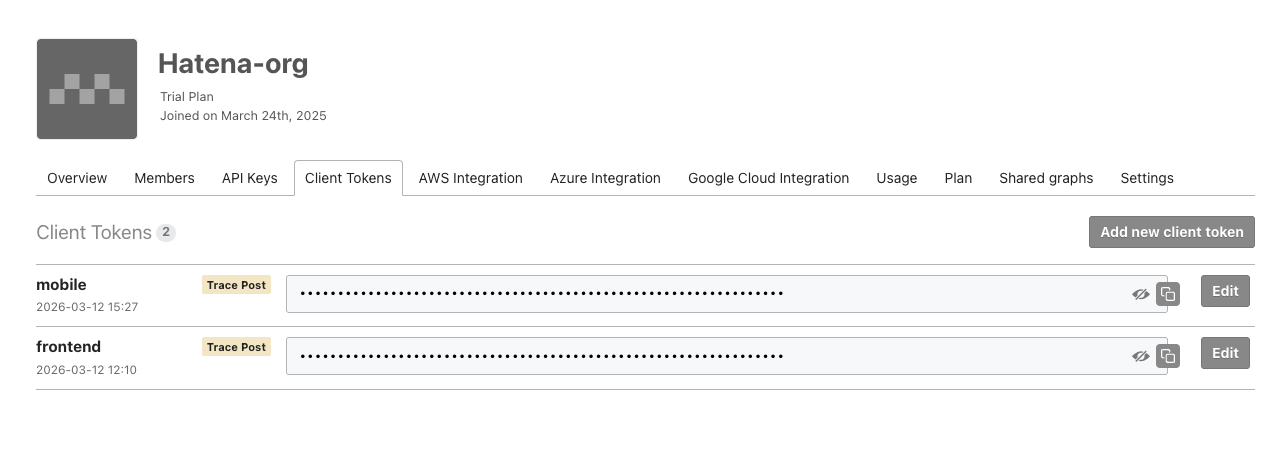
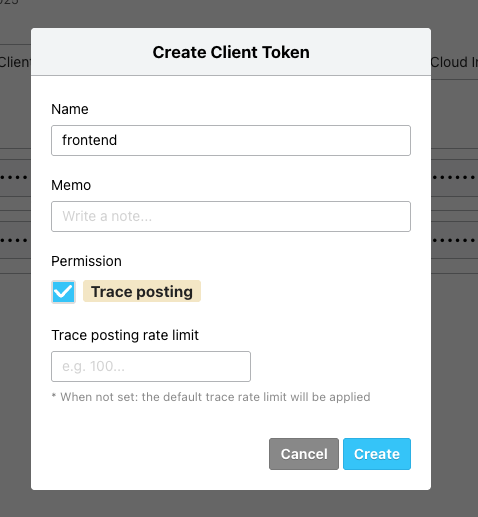
The following items can be configured when creating a token.
- Name: A name to identify the token
- Memo: Additional information about the token
- Trace posting rate limit (spans/minute): A per-token rate limit (if not set, the organization's default rate limit applies)
Created tokens are 64-character alphanumeric strings.
Deleting client tokens
Client tokens that are no longer needed can be deleted from the dashboard. Once a token is deleted, trace posts using that token will be immediately rejected.
When a token is deleted, email notifications are sent to the organization's owner and managers.
Rate limits
Client tokens can have a per-token trace posting rate limit (spans/minute) configured. Since a large volume of traces may be posted by many users from the frontend, configuring appropriate rate limits is recommended.
Rate limits are evaluated in the following order.
- Per-token rate limit (the value set in
Trace posting rate limit) - Organization-wide rate limit
If either rate limit is exceeded, subsequent spans will be rejected, and a 429 error will be returned to the sender.
If no per-token rate limit is set, only the organization-wide rate limit applies.
Sampling recommendations
Since traces from the frontend can generate a large volume proportional to the number of users, configuring appropriate sampling is strongly recommended.
The OpenTelemetry SDK provides standard sampling functionality. For example, by using TraceIdRatioBasedSampler, you can configure it to send only a certain percentage of traces.
import { TraceIdRatioBasedSampler } from '@opentelemetry/sdk-trace-base';

const provider = new WebTracerProvider({
  sampler: new TraceIdRatioBasedSampler(0.1), // Record only 10% of traces
});
Usage
For specific instructions on how to post traces from the browser using client tokens, refer to the following page.
