Alert notifications from Mackerel can be sent via email.
The notification will include a link to the alert, the service or role to which the offending host belongs, and any associated graphs.
Adding email alert notifications
To add a new Email notification channel, click on “Monitors,” then “Channel Settings,” then “New Channel”. Choose Email notification from the list of integrations and give the new notification channel a name. (e.g. "email to team")
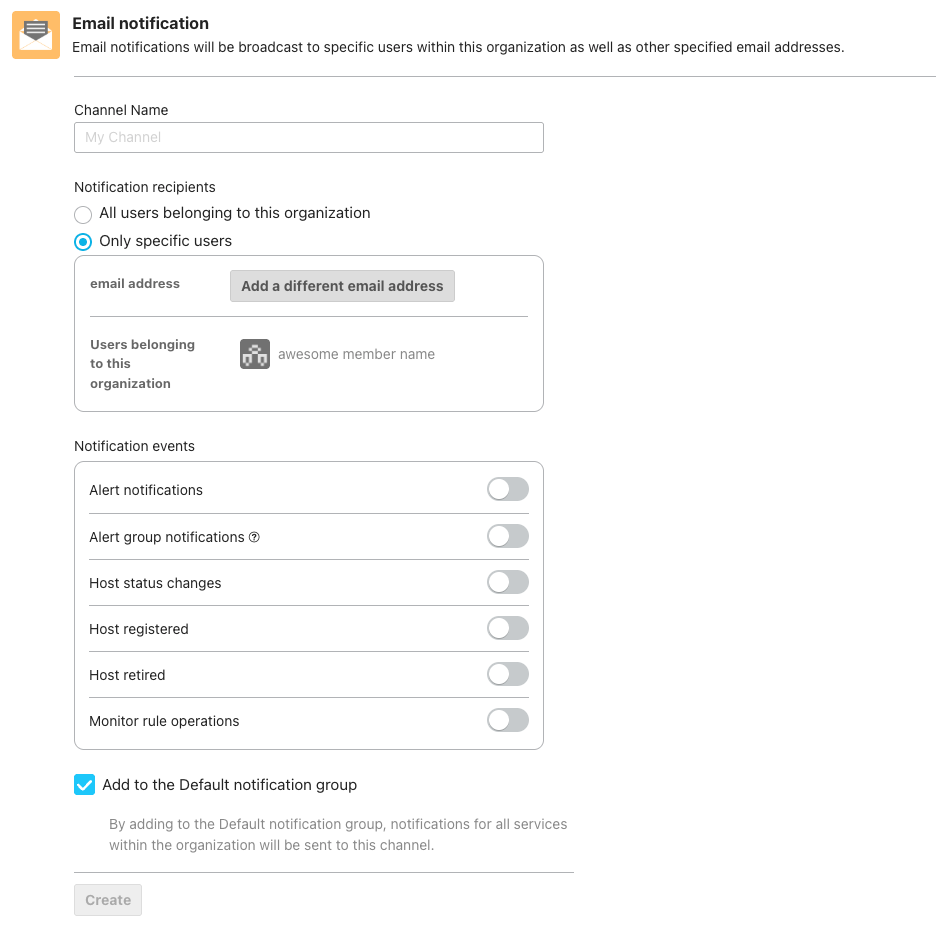
You can select individual email addresses or users belonging to an organization as recipients of emails.
When emails are not delivered (About the bounce list)
If a delivery failure occurs for recipients in an email notification channel, those email addresses may be added to a bounce list. Once added to the bounce list, emails will no longer be sent to those addresses.
Notifications for bounce list registration
When an email address is added to the bounce list, a notification email will be sent to the organization owner.
Subject: [Mackerel] Failed to send to some users belonging to "Organization Name" organization
Removal from the bounce list
The support team will handle the removal of email addresses from the bounce list. Please contact us via the contact form.
Specifications and notes
- Bounce list status is checked at 30-minute intervals.
- If the owner's email address is added to the bounce list, notifications cannot be received.
- Notifications cannot be sent to email addresses other than the owner's.
- A notification is sent only when an email address is newly added to the bounce list.
- Repeated notifications are not sent for email addresses that are already on the bounce list.
- If an address is removed from the list and then added again, a notification will be sent.
- Only email addresses of accounts registered with Mackerel are eligible for notifications.
- No notification will be sent if an email address specified as a "Only specific user" is added to the bounce list.
