Hello! This is Toya ( id:KGA) from the Mackerel Team CRE. Here are the details of this update.
- Added installation scripts for Mackerel Distro of OpenTelemetry (MDOT) Collector deb/rpm packages
- [Announcement] Email Notification Channel API will now distinguish between email notifications to "All users belonging to this organization" and to "Only specific users"
- mackerel-container-agent now supports Amazon ECS Managed Instances
- Updates to various plugins and mkr commands
- Kubernetes 1.31 is no longer supported by mackerel-container-agent
Added installation scripts for Mackerel Distro of OpenTelemetry (MDOT) Collector deb/rpm packages
We have added installation scripts for the Mackerel Distro of OpenTelemetry (MDOT) Collector deb/rpm packages. MDOT is an OpenTelemetry Collector distribution that allows you to send OpenTelemetry-formatted telemetry signals to Mackerel without the need for complex configuration. The addition of these installation scripts means that installation and daemon configuration have gotten much simpler, making it easier to collect traces and labeled metrics.
deb package installation method:
curl -fsSL https://mackerel.io/file/script/opentelemetry-collector-mackerel/setup-apt.sh | MACKEREL_APIKEY='<YOUR_API_KEY>' sh
rpm package installation method:
curl -fsSL https://mackerel.io/file/script/opentelemetry-collector-mackerel/setup-yum.sh | MACKEREL_APIKEY='<YOUR_API_KEY>' sh
Please see the documentation for more details.
Sample execution of deb package installation
ubuntu@ip-172-31-0-155:~$ curl -fsSL https://mackerel.io/file/script/opentelemetry-collector-mackerel/setup-apt.sh | MACKEREL_APIKEY='***' sh
Superuser authority is required to setup Mackerel Distro of OpenTelemetry (MDOT) Collector:
+ command -v curl
/usr/bin/curl
+ http_get=curl -LfsS
+ [ curl -LfsS =  ]
+ dpkg --print-architecture
+ ARCH=amd64
+ curl -LfsS https://api.github.com/repos/mackerelio/opentelemetry-collector-mackerel/releases/latest
+ + grepcut -d " -f 4
 browser_download_url.*linux_amd64.deb
+ DEB_URL=https://github.com/mackerelio/opentelemetry-collector-mackerel/releases/download/v0.6.0/otelcol-mackerel_0.6.0_linux_amd64.deb
+ mktemp --suffix=.deb
+ TMP_DEB=/tmp/tmp.r9DDXCQREc.deb
+ trap rm -f /tmp/tmp.r9DDXCQREc.deb; exit 1 HUP INT QUIT TERM
+ curl -LfsS https://github.com/mackerelio/opentelemetry-collector-mackerel/releases/download/v0.6.0/otelcol-mackerel_0.6.0_linux_amd64.deb
+ getent passwd _apt
+ chown _apt /tmp/tmp.r9DDXCQREc.deb
+ apt install -y /tmp/tmp.r9DDXCQREc.deb
Reading package lists... Done
Building dependency tree... Done
Reading state information... Done
Note, selecting 'otelcol-mackerel' instead of '/tmp/tmp.r9DDXCQREc.deb'
The following NEW packages will be installed:
  otelcol-mackerel
0 upgraded, 1 newly installed, 0 to remove and 0 not upgraded.
Need to get 0 B/35.7 MB of archives.
After this operation, 141 MB of additional disk space will be used.
Get:1 /tmp/tmp.r9DDXCQREc.deb otelcol-mackerel amd64 0.6.0 [35.7 MB]
Selecting previously unselected package otelcol-mackerel.
(Reading database ... 71735 files and directories currently installed.)
Preparing to unpack /tmp/tmp.r9DDXCQREc.deb ...
Unpacking otelcol-mackerel (0.6.0) ...
Setting up otelcol-mackerel (0.6.0) ...
Created symlink /etc/systemd/system/multi-user.target.wants/otelcol-mackerel.service → /usr/lib/systemd/system/otelcol-mackerel.service.
Scanning processes...
Scanning linux images...

Running kernel seems to be up-to-date.

No services need to be restarted.

No containers need to be restarted.

No user sessions are running outdated binaries.

No VM guests are running outdated hypervisor (qemu) binaries on this host.
+ rm -f /tmp/tmp.r9DDXCQREc.deb
+ echo MACKEREL_APIKEY=***
+ systemctl reset-failed otelcol-mackerel.service
+ systemctl restart otelcol-mackerel.service
*************************************

     Done! Welcome to Mackerel Distro of OpenTelemetry (MDOT) Collector!

*************************************
ubuntu@ip-172-31-0-155:~$ systemctl status otelcol-mackerel.service
● otelcol-mackerel.service - Mackerel OpenTelemetry Collector
     Loaded: loaded (/usr/lib/systemd/system/otelcol-mackerel.service; enabled; preset: enabled)
     Active: active (running) since Tue 2025-12-23 01:57:07 UTC; 24s ago
   Main PID: 1643 (otelcol-mackere)
      Tasks: 7 (limit: 2204)
     Memory: 12.7M (peak: 13.0M)
        CPU: 73ms
     CGroup: /system.slice/otelcol-mackerel.service
             └─1643 /usr/bin/otelcol-mackerel --config=mackerel:default

Dec 23 01:57:07 ip-172-31-0-155 otelcol-mackerel[1643]: 2025-12-23T01:57:07.170Z        info        builders/builders.go:26        Development component. May change in the future.        {"resource": {"service.instance.id": "4698>
Dec 23 01:57:07 ip-172-31-0-155 otelcol-mackerel[1643]: 2025-12-23T01:57:07.171Z        info        service@v0.142.0/service.go:250        Starting otelcol-mackerel...        {"resource": {"service.instance.id": "46981d50-73b5-44>
Dec 23 01:57:07 ip-172-31-0-155 otelcol-mackerel[1643]: 2025-12-23T01:57:07.171Z        info        extensions/extensions.go:40        Starting extensions...        {"resource": {"service.instance.id": "46981d50-73b5-4467-94e6-cb>
Dec 23 01:57:07 ip-172-31-0-155 otelcol-mackerel[1643]: 2025-12-23T01:57:07.171Z        info        internal/resourcedetection.go:166        began pdetecting resource information        {"resource": {"service.instance.id": "46981d>
Dec 23 01:57:07 ip-172-31-0-155 otelcol-mackerel[1643]: 2025-12-23T01:57:07.172Z        info        internal/resourcedetection.go:223        detected resource information        {"resource": {"service.instance.id": "46981d50-73b5>
Dec 23 01:57:07 ip-172-31-0-155 otelcol-mackerel[1643]: 2025-12-23T01:57:07.172Z        info        otlpreceiver@v0.142.0/otlp.go:120        Starting GRPC server        {"resource": {"service.instance.id": "46981d50-73b5-4467-94e>
Dec 23 01:57:07 ip-172-31-0-155 otelcol-mackerel[1643]: 2025-12-23T01:57:07.172Z        info        otlpreceiver@v0.142.0/otlp.go:178        Starting HTTP server        {"resource": {"service.instance.id": "46981d50-73b5-4467-94e>
Dec 23 01:57:07 ip-172-31-0-155 otelcol-mackerel[1643]: 2025-12-23T01:57:07.173Z        info        internal/resourcedetection.go:166        began detecting resource information        {"resource": {"service.instance.id": "46981d>
Dec 23 01:57:07 ip-172-31-0-155 otelcol-mackerel[1643]: 2025-12-23T01:57:07.176Z        info        internal/resourcedetection.go:223        detected resource information        {"resource": {"service.instance.id": "46981d50-73b5>
Dec 23 01:57:07 ip-172-31-0-155 otelcol-mackerel[1643]: 2025-12-23T01:57:07.176Z        info        service@v0.142.0/service.go:273        Everything is ready. Begin running and processing data.        {"resource": {"service.inst>
[Announcement] Email Notification Channel API will now distinguish between email notifications to "All users belonging to this organization" and to "Only specific users"
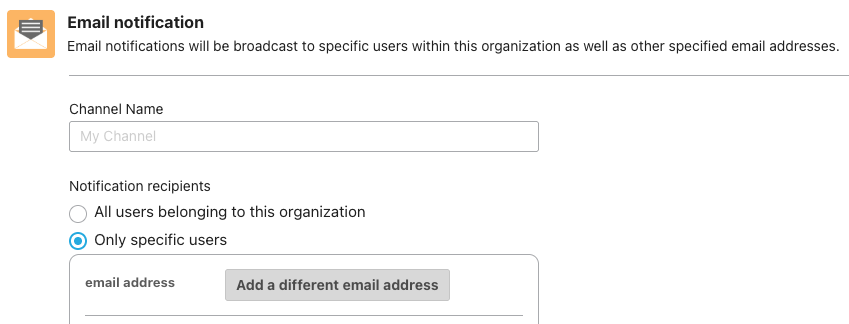
Previously, the Mackerel API did not distinguish between "All users belonging to this organization" and "Only specific users" as email notification channel types (the type key in the Notification Channel API). This will be changed as follows:
- Before change
- All users belonging to this organization:
type: "email" - Only specific users:
type: "email"
- All users belonging to this organization:
- After change
- All users belonging to this organization:
type: "email-broadcast" - Only specific users:
type: "email"
- All users belonging to this organization:
Please keep this in mind if you use the API for automation or the like. This change is scheduled to occur in January 2026.
mackerel-container-agent now supports Amazon ECS Managed Instances
mackerel-container-agent now supports Amazon ECS Managed Instances, a new launch type for Amazon ECS announced in September this year. Using version v0.13.0 or later, you can now monitor metrics of containers running on Amazon ECS Managed Instances with Mackerel.
For more details on mackerel-container-agent, please see the documentation.
Updates to various plugins and mkr commands
We want to let you know about the release of some plugins and mkr commands. The updates to mackerel-plugin-redis, check-redis, and mkr dashboards pull were contributed by Mackerel user  id:sfujiwara. Thank you!
mackerel-plugin-redis now supports collection of metrics from Redis/Valkey cluster nodes
mackerel-plugin-redis can now collect metrics from cluster nodes when Redis/Valkey is running in cluster mode. The following 4 graphs and 15 metrics are being added. For details on each value, please see the CLUSTER INFO command documentation.
- Cluster
- Known Nodes
- Size
- Cluster State
- State (1: ok, 0: fail)
- Cluster Slots
- Slots Assigned
- Slots OK
- Slots PFAIL
- Slots FAIL
- Cluster Stats
- Messages PING Sent
- Messages PONG Sent
- Messages FAIL Sent
- Messages Sent
- Messages PING Received
- Messages PONG Received
- Messages FAIL Received
- Messages Received
Available starting with mackerel-agent-plugins v0.90.0.
check-redis now supports ACL authentication
A --username option has been added to the check-redis command. By combining the --username and --password options, you can now utilize ACL authentication, introduced starting with Redis 6.0.
Available starting with mackerel-check-plugins v0.51.0.
mkr dashboards pull command now supports retrieval of dashboards by ID
It is now possible with the mkr dashboards pull command to retrieve only a specific dashboard by specifying the dashboard ID with --id. This is convenient to use when you want to manage or edit individual dashboards.
Available starting with mkr v0.63.0.
Added mkr users subcommand
The mkr users subcommand, which allows you to retrieve a list of users, has been added to the mkr command. Support for the --jq option is included, providing convenience by enabling retrieval of specific user information through filtering or incorporation into automation scripts.
Also available starting with mkr v0.63.0.
Kubernetes 1.31 is no longer supported by mackerel-container-agent
Due to the end of standard support for Amazon EKS Kubernetes on November 26th, 2025, Kubernetes 1.31 is no longer supported by mackerel-container-agent. Please see the help page for supported versions. Thank you for your understanding.
