
Hello, this is Mackerel CRE's  id:kmuto .
Mackerel values feedback from our users. Several features introduced this time were implemented based on requests from our users. We look forward to receiving your continued opinions and requests.
Now, let's look at the details of this update.
- Sidebar width can now be adjusted by dragging
- Azure NetApp Files metrics are now available via the Azure integration
- Latency graphs are now available in the APM trace overview screen
- Japanese translation of MDOT (Mackerel Distro of OpenTelemetry) documentation now available
- Probabilistic sampling can now be specified via environment variables with the Mackerel OpenTelemetry Collector
- The exporter name for the Mackerel OTLP Exporter component has changed to "mackerel_otlp"
- When opening Mackerel via an alert email or similar and SAML authentication is triggered, the original URL page will now display after successful authentication
- Network interface information retrieval behavior is changed in the Windows version of mackerel-agent
- The check-windows-eventlog plugin now allows output messages to be formatted using format strings
- The mackerel-client-go library now supports functions that accept a Context object
- [Notice] Target versions for mackerel-plugin-postgres and check-postgresql plugins will be PostgreSQL 14 or later
Sidebar width can now be adjusted by dragging
You can now change the width of the sidebar in the Mackerel web console by dragging.
Items under "Dashboards" or "Services" are displayed below them, but depending on the names given, they may not fit within the sidebar width, leading to the frustrating situation where they cannot be distinguished by their initial characters alone.
By dragging the sidebar boundary to widen it, you can reveal the names that were previously hidden.
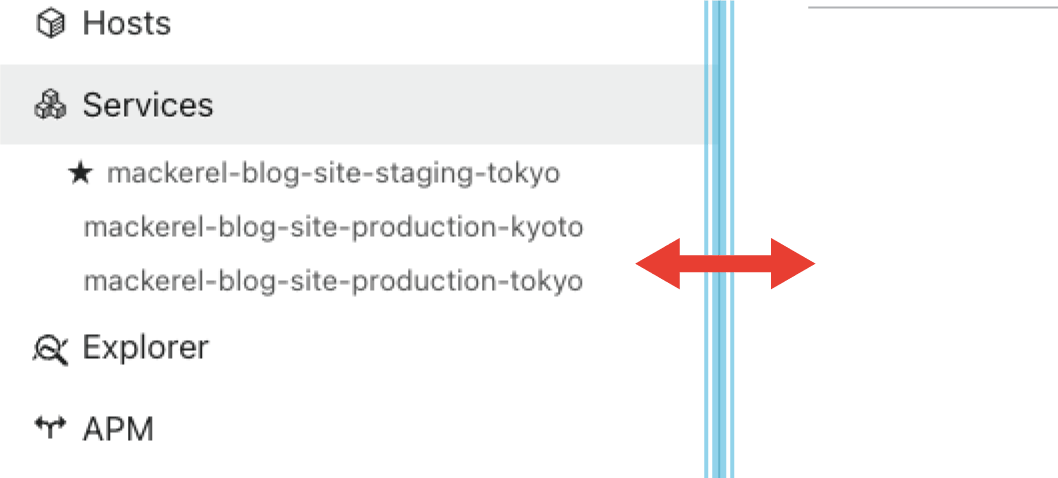
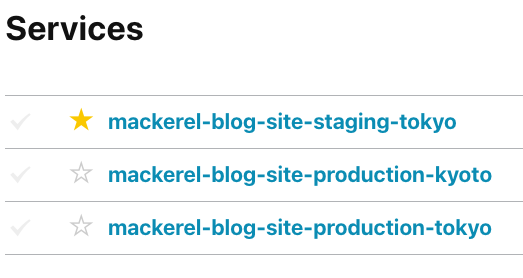
Incidentally, for frequently used items, you can pin them to the top by marking them as "Favourites" with a star. Do make use of this feature.
Azure NetApp Files metrics are now available via the Azure integration
Azure NetApp Files is an Azure service that provides NetApp storage as a managed service. This metric can now be retrieved and graphed using the Azure integration.
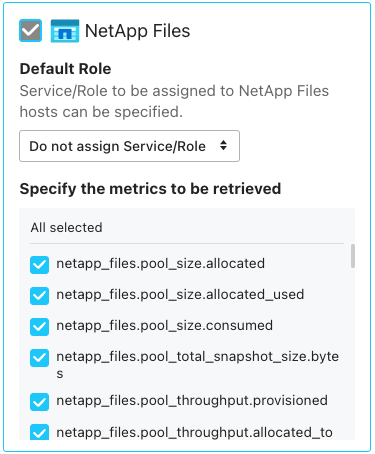
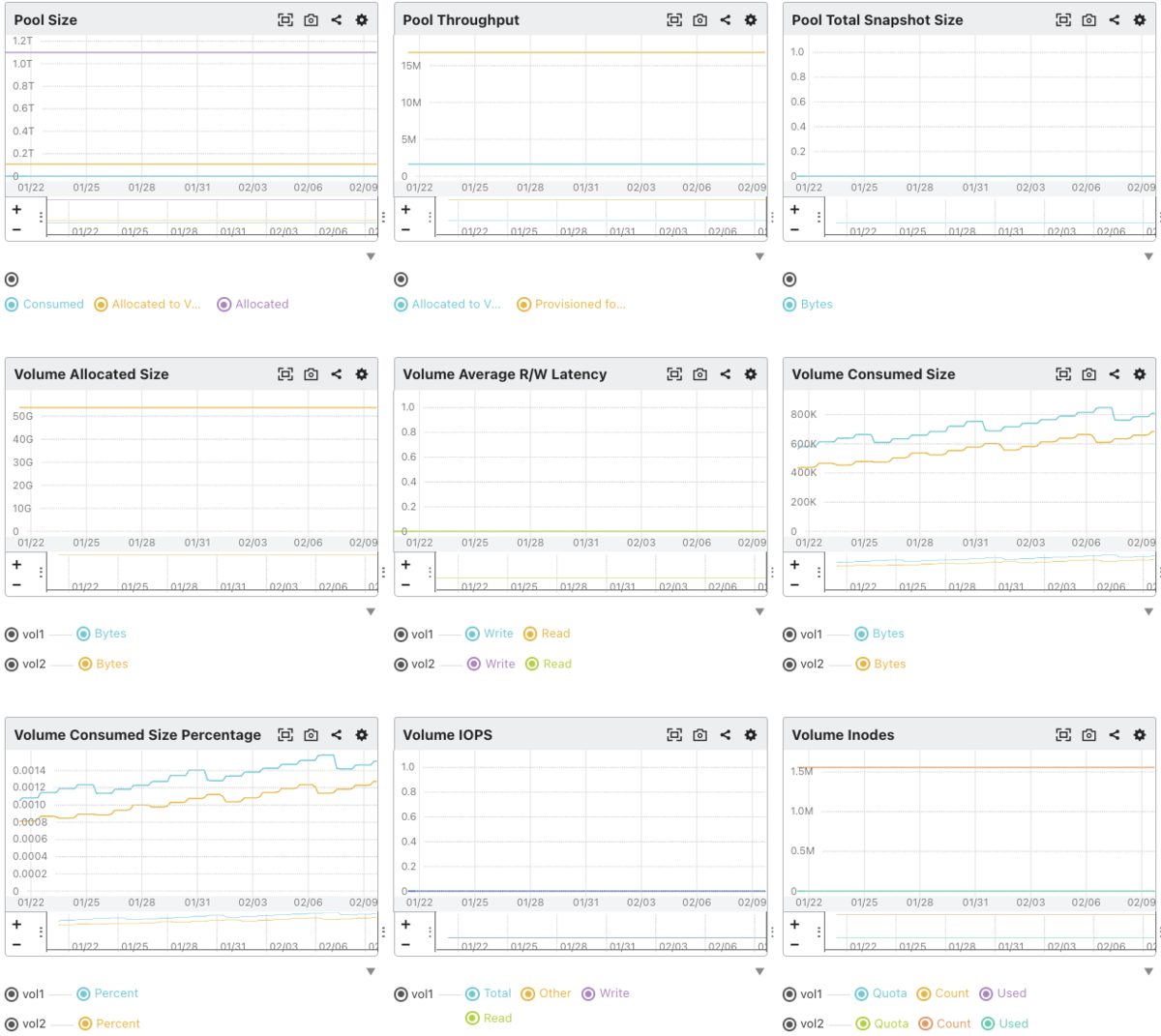
Billing is calculated at a rate of 1 capacity pool equalling 1 micro host. Furthermore, depending on the number of metrics collected, charges may apply for exceeding the maximum metrics per microhost (a maximum of 6 + 36 x (number of volumes) metrics will be collected).
For available metrics, please refer to the help documentation.
Latency graphs are now available in the APM trace overview screen
When displaying traces or spans in the APM trace overview screen, you can now select "Latency (Time Series)" as a format alongside "Latency Distribution" and "Trace Count" (or "Span Count").
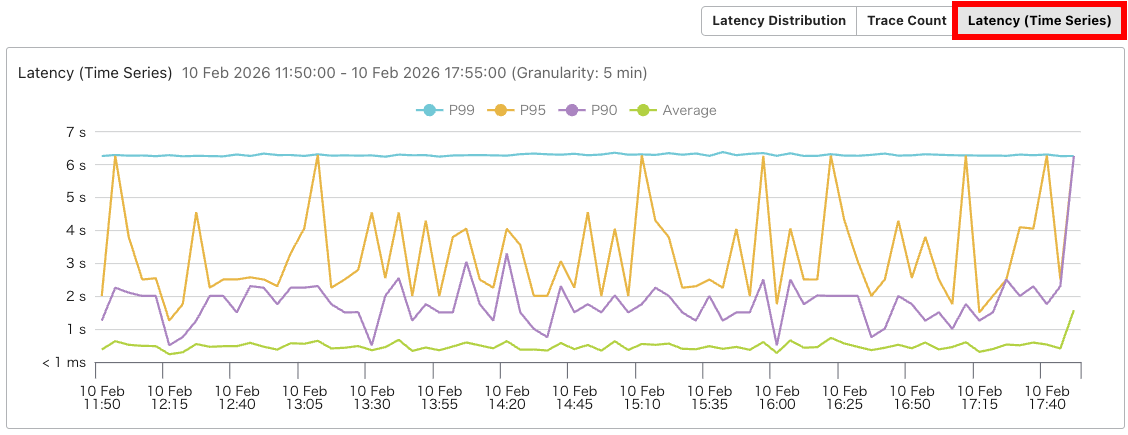
The latency of traces within the period is displayed graphically, showing percentiles (P99, P95, P90) and the average. If any sections are of interest, you can specify a range by dragging and then drill down further.
Japanese translation of MDOT (Mackerel Distro of OpenTelemetry) documentation now available
MDOT (Mackerel Distro of OpenTelemetry) is an OpenTelemetry Collector distribution for Mackerel.
This README document was previously available only in English, but we have now provided a Japanese translation.
- Mackerel Distro of OpenTelemetry (MDOT) Collector
- Mackerel OpenTelemetry Collector
- Mackerel OTLP Exporter
Probabilistic sampling can now be specified via environment variables with the Mackerel OpenTelemetry Collector
The Mackerel OpenTelemetry Collector, which enables sending OpenTelemetry telemetry to Mackerel without configuration files, now includes the ability to configure probabilistic sampling of traces via environment variables in v0.8.0.
Probabilistic sampling can be adjusted by specifying a value between 0 (select none) and 100 (select all) in the environment variable OTELCOL_MACKEREL_SAMPLING_PERCENTAGE.
The exporter name for the Mackerel OTLP Exporter component has changed to "mackerel_otlp"
In v0.9.0, the exporter name for the Mackerel OTLP Exporter component, also used by the Mackerel OpenTelemetry Collector, has been changed from mackerelotlp to mackerel_otlp (see background (in Japanese)).
If you are using the Mackerel OpenTelemetry Collector solely via environment variables, you need not concern yourself. However, if you are using a custom configuration file, or have configured a custom Collector incorporating the Mackerel OTLP Exporter component alongside a configuration file, we recommend changing the exporter name (the old mackerelotlp can still be used, but warning messages will be displayed).
For example, if you were using a configuration file like the following,
...

exporters:
  mackerelotlp:

service:
  ...
      exporters: [mackerelotlp]
make the following changes.
...

exporters:
  mackerel_otlp:

service:
  ...
      exporters: [mackerel_otlp]
When opening Mackerel via an alert email or similar and SAML authentication is triggered, the original URL page will now display after successful authentication
When clicking a URL contained in an alert email or similar, if the organization enforces SAML authentication and the SAML authentication session has expired, a screen requesting SAML authentication will open.
Following successful authentication, the system previously redirected to the organisation overview screen, which was inconvenient as it was not the page intended by the original URL. This behaviour has been revised, and the system now redirects to the page intended by the URL.
Please note that the SAML integration feature is available to customers subscribed to a higher-tier plan (in Japanese).
Network interface information retrieval behavior is changed in the Windows version of mackerel-agent
As previously announced, we have changed the method for obtaining network interface information in the Windows version of mackerel-agent.
We have identified an issue on certain versions of Windows Server where metric collection fails if the network interface device driver name contains Japanese characters. This issue was caused by a flaw in the previous implementation and is fixed in mackerel-agent v0.86.0.
As a result of this change, when updating from an existing Windows version of mackerel-agent (version 0.85.3 or earlier) to the v 0.86.0 or later, the following effects may occur:
- The network names displayed in Host Details may change
- Network interfaces that were previously excluded may become targets for metric collection
- Network interface names and metric names may change
If you are using these metrics in monitoring rules (including usage in expression graphs), please be aware that follow-up changes may be required.
The check-windows-eventlog plugin now allows output messages to be formatted using format strings
We have added functionality to the check-windows-eventlog plugin, which monitors Windows event logs, enabling output content to be formatted using format strings when generating messages. This feature is available from mackerel-agent v0.86.1 for Windows.
When the --return (or -r) option is specified, logs matching the pattern are output by default in the format Event Source:Event Message.
MyGoApp:Hello from Go application!
You can format this output using the newly added --return="format" (or -r="format") syntax and placeholders. This is particularly useful when you wish to display the "Event ID", which is not included by default.
The available placeholders are as follows:
{{source}}: Event source{{id}}: Event ID{{message}}: Event message
For example, specifying --return="Source: {{source}}, ID: {{id}}, Message: {{message}}" will produce the following output:
Source: mackerel-agent, ID: 1, Message: 2026/01/28 06:38:26 command.go:363: DEBUG <command> Posting metrics succeeded.
For further details, please refer to the help section.
The mackerel-client-go library now supports functions that accept a Context object
mackerel-client-go is an API client library for operating Mackerel functionality from Go.
In mackerel-client-go v0.40.0, we have added functions that accept a Context object. The names and signatures of these new functions maintain consistency.
- Function name: Existing function +
Context - Arguments: Takes a
context.Contexttype object as the first argument
Examples are shown below.
- Existing function:
GetAlert(alertID string) - New function:
GetAlertContext(ctx context.Context, alertID string)
The legacy functions remain available, but the new functions allow for implementation using standard Go techniques, such as stopping goroutines safely.
[Notice] Target versions for mackerel-plugin-postgres and check-postgresql plugins will be PostgreSQL 14 or later
Due to updates to libraries utilised by the plugins, the supported version for the mackerel-plugin-postgres plugin (which collects metrics from PostgreSQL servers) and the check-postgresql plugin (which checks their operation) will change to PostgreSQL 14 or later in the next plugin package release (previously PostgreSQL 8.4 or later).
Please note that if you are monitoring PostgreSQL servers older than version 14 using these plugins, updating the plugin package may cause the plugins to cease functioning correctly.
This change does not affect metrics acquired via Cloud integration.
